
In an effort to simplify the payment process for our potential LessAccounting customers, we’ve removed some fields from the current billing form. We removed the requirement of collecting the billing address. Here are the theories that lead us to remove form fields and a little bit about the repercussion from our former merchant provider.
1st Theory: Every form field you have slows the user down, delaying them from giving you money. Thus, fewer form fields means higher conversions (this is a widely postulated theory not formed by us).
2nd Theory (The “Mess Up”): Fewer form fields means higher conversions because it reduces the chance of user error. (Example: if you collect a billing address, you’ll potentially have customers enter incorrect information, meaning the billing address they enter won’t match what the bank has on file. Thus, you’ll lose a percentage of people.)
3rd Theory (On-Going Procrastination): For the past few years, we’ve collected full billing addresses for each user. Because we’re a SAAS app that bills monthly, we’d find that users would update their billing address on their banking website, but not with us. Having a bad billind address would resulting in a declined charge on the next billing date. At one point we had hundreds of bad billing addresses in our app. Having a hiccup in billing would also result in the bank data connection we have to stop connecting, missing days and days of transactions causing issues in their financial books in our app (double whammy).
<!– fix half image –>
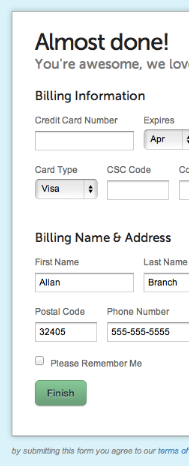
We trimmed the billing form down to the minimum amount of data needed, as shown below.
Then, within our merchant account, we have as lenient settings as possible (in order to get as few declined card as possible).
After a few months of improved billing charges, CyberSource insisted that we add more form fields to the billing form. They wanted the following included:
We wanted less form fields, because it’s less information to “mess up”. We had a choice; either add these address fields or change merchants. We ended up changing merchants from CyberSource to FrontStream.
We still have the trimmed down billing form, and we still see less declined charges for our customers.

If you wanted it to build a product you’d find a way to get time to work on it. If you really wanted to start that new hobby you’d sacrifice something to find the time and money to do it.
I'll define a "Wannabe Entrepreneur" as someone who has never made money from their businesses. Here are the different types of wannabes.
In the past few years I've built go-carts, built a 200+ sq ft workshop, written several eBooks. How do I create a life where I have time to work on side projects?
Receive 5 Software projects mistakes we have made over the years and how to avoid them.